The invitation is simple: let’s play something together tonight. The setup questions arrive later. Does everyone need a copy? Are you looking at the same view? Can a third person join? Is “multiplayer” describing people on the sofa or people on separate machines?
It is easy to start with hardware because hardware is visible. A spare controller looks like a solution. But the first decision is the shape of the evening: how many people are participating, how they take turns, and what each person can see and control.
Once that is clear, equipment becomes a compatibility question instead of a guess. The aim is not the most elaborate setup. It is getting everyone into the kind of play you actually meant to share.
Together can mean several different things
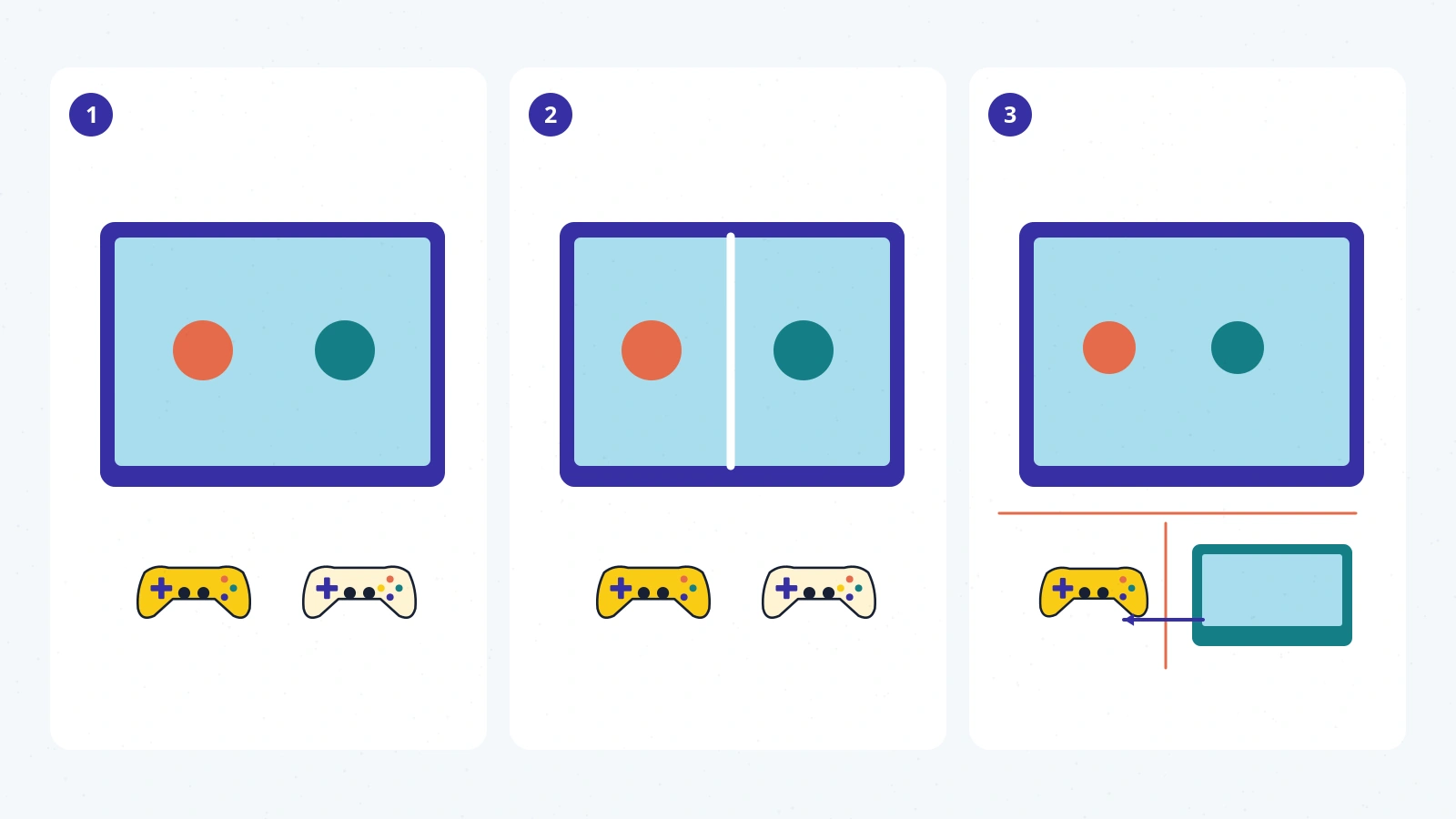
Imagine three entirely fictional games. In the first, two characters share a single view of a small room. In the second, the screen is divided so each player has a separate camera. In the third, the players alternate turns and pass one controller between them.
All three could make sense in a living room. They make different demands, however. The shared view asks players to understand one scene together. Split-screen gives each person a distinct view within a smaller portion of the display. Passing a controller changes the rhythm: one person acts while another watches, discusses, or waits.
None of these arrangements is inherently more social. A quiet turn-taking puzzle can create a conversation; a simultaneous game can keep everyone absorbed in separate tasks. The important question is whether the arrangement fits the people and the time you have.
Before reading a shopping list, finish the sentence: “We want two people doing something at the same time,” or “We are happy to take turns,” or “We want everyone to help make the decisions.” Those are different invitations.
“Co-op” does not settle the screen arrangement
EA presents It Takes Two as a two-player adventure supporting local and online cooperative play with split-screen presentation. That is a specific design and participation model, not proof that another game marked “co-op” will work the same way. 1
The title is a useful example because several questions have distinct answers: how many players, whether they are together physically, and how their views are displayed. A storefront category may answer only one of those questions.
A cooperative game can still be unsuitable for the evening you planned. Perhaps one person wants to watch rather than maintain a character. Perhaps three people want equal participation in a two-player experience. You can choose to rotate, but that is your arrangement around the game, not a built-in three-player mode.
Be particularly careful with maximum-player labels. Ask whether the number applies to local play, online play, a particular mode, or a mixture of local and remote participants. A broad multiplayer badge should be the beginning of the check, not its conclusion.
Remote play and native online play are not synonyms
Valve’s Steam Remote Play Together documentation describes a host running a supported local multiplayer game while sharing its video and audio with invited players and receiving their inputs. Valve says one player owns and runs the game in that setup. The remote participants are joining a streamed local experience, not necessarily separate running copies of a game with its own online mode. 2
That difference can matter even when the result feels pleasantly straightforward. The host’s machine and the connection become part of the arrangement. A game’s local design also remains relevant: streaming a shared camera does not automatically give everyone a separate camera.
This is not a claim that streaming is better or worse. It is a reason to read the name of the supported feature carefully. “Online multiplayer,” “Remote Play Together,” and “local multiplayer” should not be treated as interchangeable promises.
For an evening with people in different homes, check the actual supported route before asking everyone to install or purchase something. For an evening in one room, do not add a networked setup merely because a remote option exists.
Versions can change the answer
The official Stardew Valley 1.5 changelog records the addition of split-screen multiplayer. That historical update is a concrete example of why a game’s name alone may not settle a setup question. The relevant edition, platform, and version still need checking. 3
This article is not a current platform-by-platform compatibility table for Stardew Valley. The point is narrower: a feature can be added, and an old description can remain discoverable afterward. Equally, a feature on one platform should not be assumed to exist on every other release.
When you find a useful guide, look for the date and the version it discusses. Then compare its claims with current official documentation for the device you actually have. If those details cannot be reconciled, label the answer uncertain rather than treating a familiar game logo as sufficient evidence.
The same care applies to accessories. A controller that connects to a device is not automatically supported in every mode of every game. Confirm the input combination, not just the existence of the connector.
Check the room as well as the machine
Here is a practical rehearsal you can conduct without shopping: use a game you already own and know supports your intended setup. Sit where everyone would sit, join the intended mode, and read the important information from those places.
A display that feels large to one player may distribute attention very differently when divided. The issue is not just resolution. Consider whether a person can read their prompts, distinguish their area, and follow what is happening without constantly leaning forward or asking another player to interpret it.
Then test the less glamorous moments. Can everyone pause when needed? Who controls the menus? What happens if one controller disconnects? Can one participant leave without abandoning the whole session? Do not assume the answers are bad; simply discover them before the evening depends on them.
Comfort is part of the plan. So is the ability to stop. A delightful ten-minute session can be more successful than a theoretically perfect setup that takes an hour to assemble.
Buy for the verified gap
Once you know the mode and have tested what you already own, a hardware need becomes easier to describe. “We need one more compatible input device for this verified two-player local mode” is a much better purchasing brief than “We should get something for multiplayer.”
Sometimes the missing piece is not a device. It is a different game, clearer expectations about taking turns, or enough time to finish the tutorial before friends arrive. Sometimes no purchase is necessary at all.
There are no tested-product recommendations or affiliate links in this article. It is a planning guide, not a hardware review. The linked official pages support the specific examples; they do not certify an untested household setup.
The best local multiplayer arrangement is the one in which the equipment recedes and the people become the point. Decide what sharing should feel like first. Then check the smallest set of requirements that makes that evening possible.